
BWM ReferenceWiring
RJ45 / 8P8C Ethernet: T568A and T568B
Match numbered contacts and twisted pairs when terminating Ethernet cable.
Applies to: Contact assignments for T568A/B. This is not a rear punch-down layout or a PoE injection circuit.
When to use it
Making a straight-through patch lead or terminating a compatible data jack.
Why it works this way
Keeping each twisted pair together matters even when a basic continuity test passes.
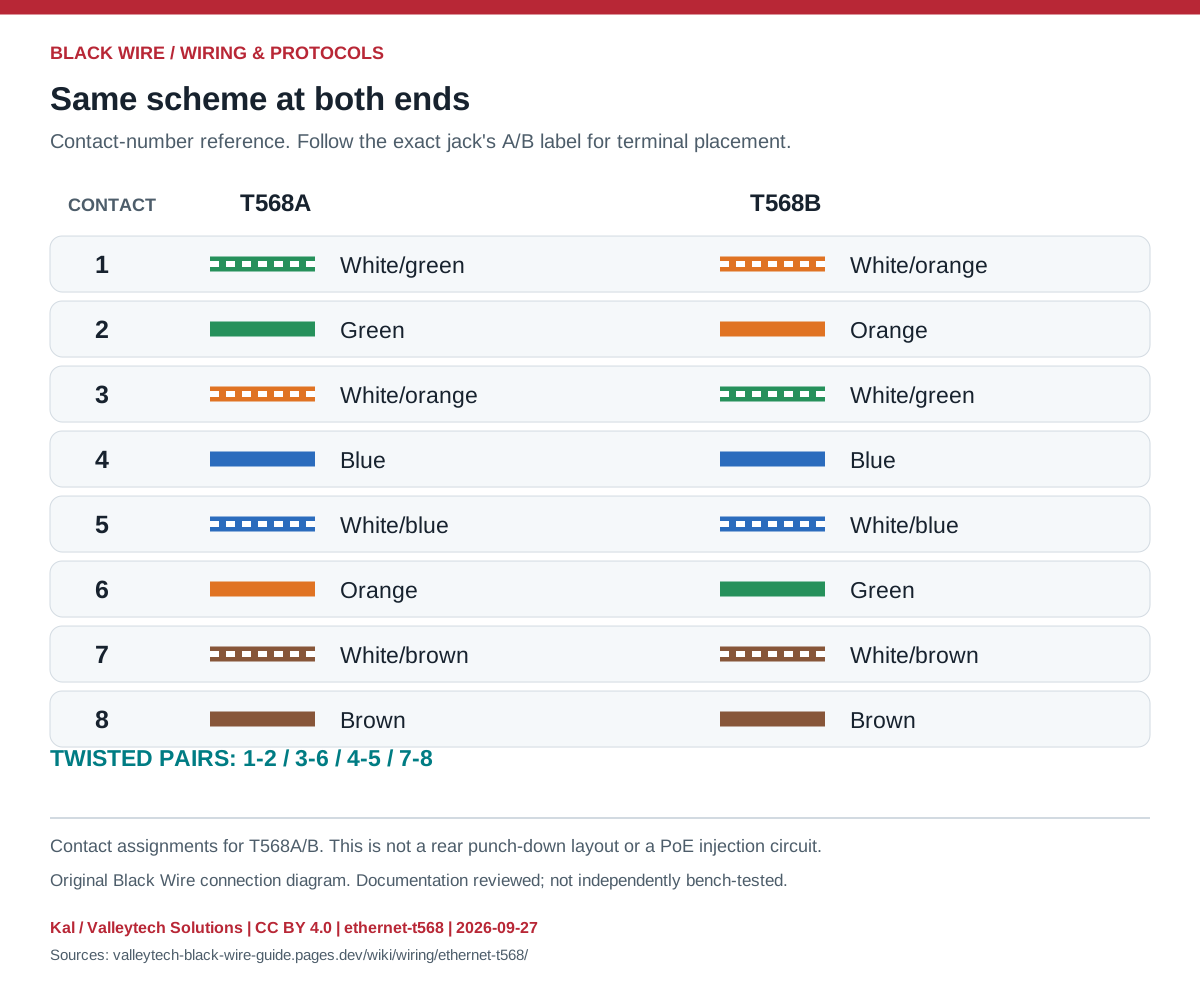
Connection reference
| Contact | T568A | T568B |
|---|---|---|
| 1 | White/green | White/orange |
| 2 | Green | Orange |
| 3 | White/orange | White/green |
| 4 | Blue | Blue |
| 5 | White/blue | White/blue |
| 6 | Orange | Green |
| 7 | White/brown | White/brown |
| 8 | Brown | Brown |
Make the connection
- Identify contact 1 using the connector drawing; plug and socket views can appear mirrored.
- Use A at both ends or B at both ends for a straight-through lead. Preserve pairs 1-2, 3-6, 4-5 and 7-8.
- Use a suitable cable tester; check pair assignment as well as opens and shorts.
Check before powering
- Rear IDC terminal order varies by jack; do not copy the plug's left-to-right order onto it.
- An 8P8C socket may carry non-Ethernet signals. Confirm the equipment documentation before connecting it.
Sources & review
Source documents inspected; independent electrical and bench review pending. Reviewed 2026-09-27.
- Leviton Cat 5e / Cat 6 jack instructions
Table 1: T568A/B contact assignments and jack termination labels · checked 2026-09-27 - Fluke Networks: RJ connector naming
RJ11 / RJ14 / RJ25 versus modular connector contact counts · checked 2026-09-27
Original writing and diagram by Kal / Valleytech Solutions, CC BY 4.0. Manufacturer artwork and documentation retain their own rights. CC BY 4.0
Diagram fingerprint
26d108697685fa6266358f15630b133eef2972878f762bb375bd4560a7289400